Released on October 16, 2025, the latest Auto Forward For Telegram v1.0.37 update focuses on doing more with less effort. It’s built for users who value efficiency — helping you reduce repetitive actions while still accomplishing everything you need.
This version introduces a series of thoughtful improvements that give you greater control, cleaner message output, and a smoother overall experience. In short, it’s a compact update that delivers a big usability boost.
Let’s take a closer look at what’s new and why these enhancements matter.
⭐ Toggle All Tasks in a Folder — Auto Forward For Telegram v1.0.37
Previously, managing multiple tasks meant turning each one on or off manually — a time-consuming process for anyone handling large setups.
Now, the latest update introduces two handy buttons right at the folder level: “Activate All Tasks” and “Stop All Tasks”
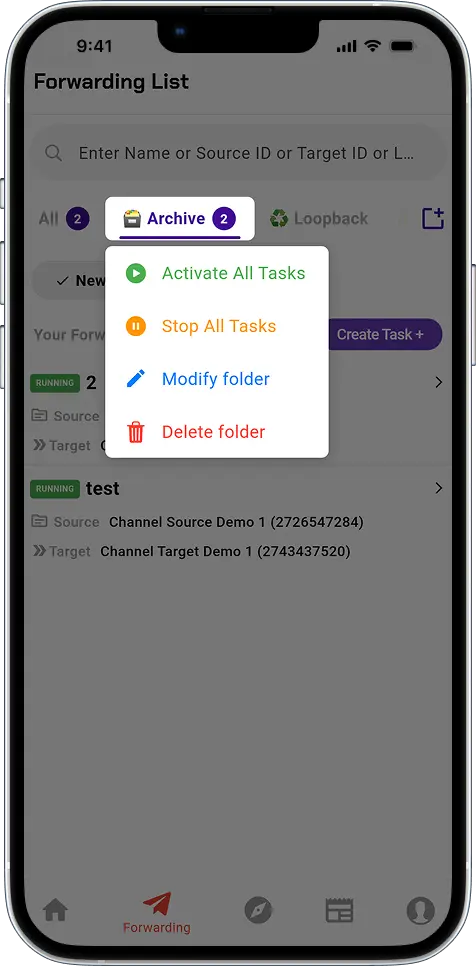
With just one click, you can instantly start or stop every task within the selected folder, saving time and keeping your automation perfectly in sync.
👉 Learn more here
🧼 Auto-Hide Header When the Content is Empty — Auto Forward For Telegram v1.0.37
We’ve also added a new option inside the Add Header/Add Footer section, giving you greater control over when your custom content appears at the top or bottom of a forwarded message.
If you enable the “Hide when empty” switch, the bot will automatically skip inserting headers or footers whenever the forwarded message contains no text — such as when it only includes a photo, video, or other media.
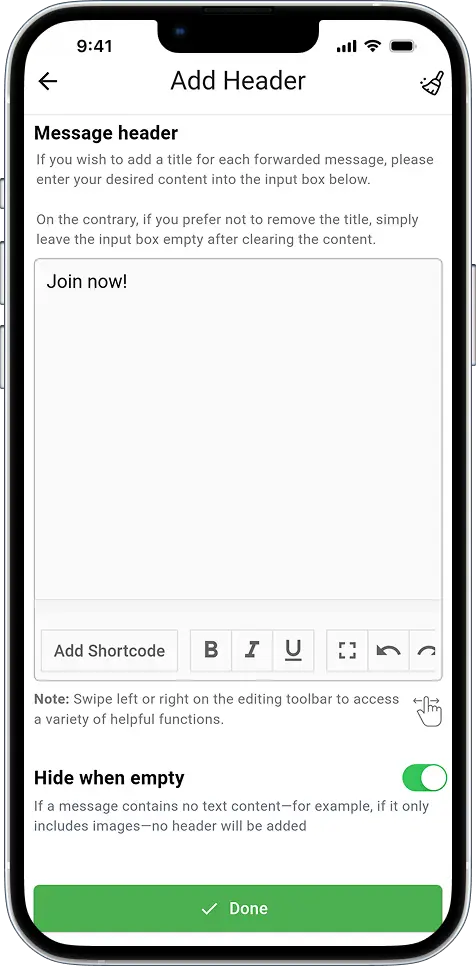
However, if you disable this option, your predefined header and footer will always be added, regardless of whether the message includes text or not.
This improvement ensures that your forwarded messages remain clean, relevant, and perfectly formatted — no more awkward empty blocks or unnecessary headers cluttering your chat.
👉 Explore this feature
🚀 Show Forward Header — Total Transparency, Just the Way You Want
You now have two new options to control how the “Forwarded from …” header appears in messages automatically forwarded to your target chat.
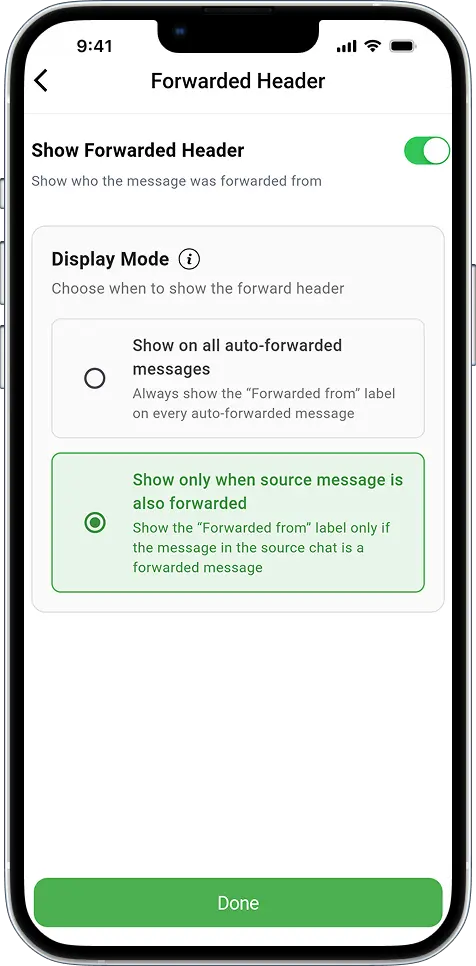
1️⃣ Show on all auto-forwarded messages
When this mode is enabled, the “Forwarded from …” header will always appear on every auto-forwarded message — regardless of the source.
2️⃣ Show only when source message is also forwarded
This mode keeps the target chat perfectly synchronized with the original message behavior in Telegram.
- If the message in the source chat is not a forwarded one, the target chat won’t show any header.
- But if the message in the source chat was forwarded from elsewhere, the target chat will display the “Forwarded from …” header accordingly.
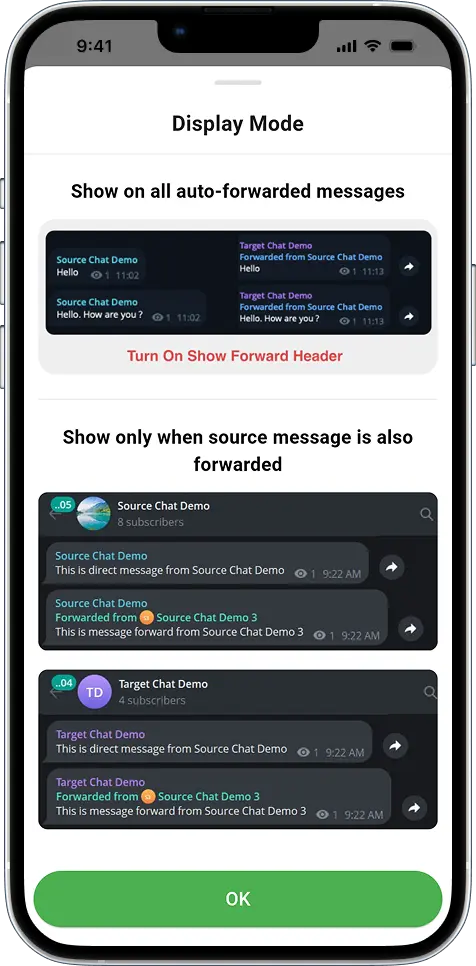
In short, this update ensures that your forwarded messages accurately reflect the original state of each source message — giving you cleaner visibility and a more consistent automation experience overall.
👉 See how it works
🧪 Small Changes, Big Impact
These updates may seem minor at first glance, but they deliver a clear impact in daily use. Each change trims manual effort, sharpens forwarded content, and makes it easier to read — so your automation not only performs better, it communicates better.
📲 Update Now and Experience the Difference
Auto Forward For Telegram v1.0.37 is available right now on all major platforms. Whichever device you use, it’s time to update and explore the improvements yourself:
iOS: App Store
Android: Google Play
Web: web.autoforwardtelegram.com
Telegram Bot: @Auto_Forward_Messages_Bot
💬 Share Your Thoughts
We’d love to hear what you think about this update. Whether it’s feedback, suggestions, or new feature ideas, feel free to reach us anytime at @RedFoxHelp.
Above all, your input helps shape the future of Auto Forward For Telegram — making it smarter, faster, and even more user-friendly with every version.
So, don’t wait. Update now and see how v1.0.37 redefines your automation experience.