
Released on July 5, 2025, the latest version of Auto Forward For Telegram brings several long-awaited improvements—designed to simplify message automation while unlocking a new level of control in task management and forwarding logic.
Whether you’re managing crypto channels, news updates, or group conversations, etc, Auto Forward For Telegram version 1.0.33 makes it easier than ever to organize your forwarding tasks into clear, structured folders—tailored to how you work.
Let’s explore what makes this version different—and how you can make the most of it starting today.
📁 Organize Your Workflow with Folder Tasks
Managing multiple forwarding rules across various Telegram chats can quickly become messy. With version 1.0.33, folder-based task grouping helps you organize everything in one place—clean, clear, and under control.
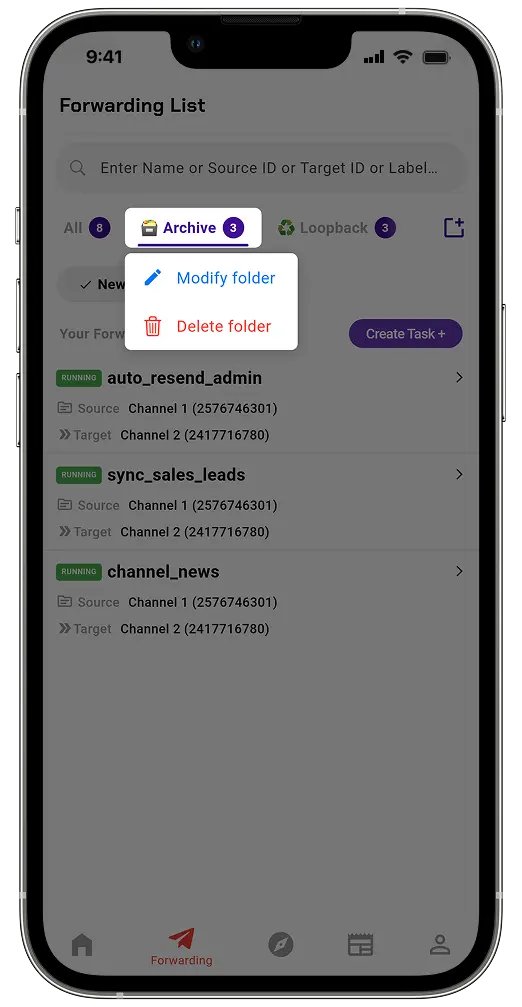
Why Folders Matter:
- Organize tasks into folders by theme or function.
- Categorize tasks clearly—by crypto, news, community, or anything else
- Avoid confusion when working with dozens of forwarding rules
- Maintain a clean, structured workspace that scales as your needs grow
Real-World Applications:
- Crypto traders can group market signals separately from general updates
- News curators can manage breaking alerts apart from evergreen content
- Community managers can keep moderation flows distinct from announcements
📌 Tip: To edit a folder, just press and hold the folder name for about 2 seconds. A popup will appear letting you rename or manage it without needing to re-create anything.
🔄 White List & Black List by Reply – Thread-Aware Filtering
Unfiltered replies can flood your destination channels with unrelated content. This update adds reply-sensitive filters that make sure you only forward what matters.
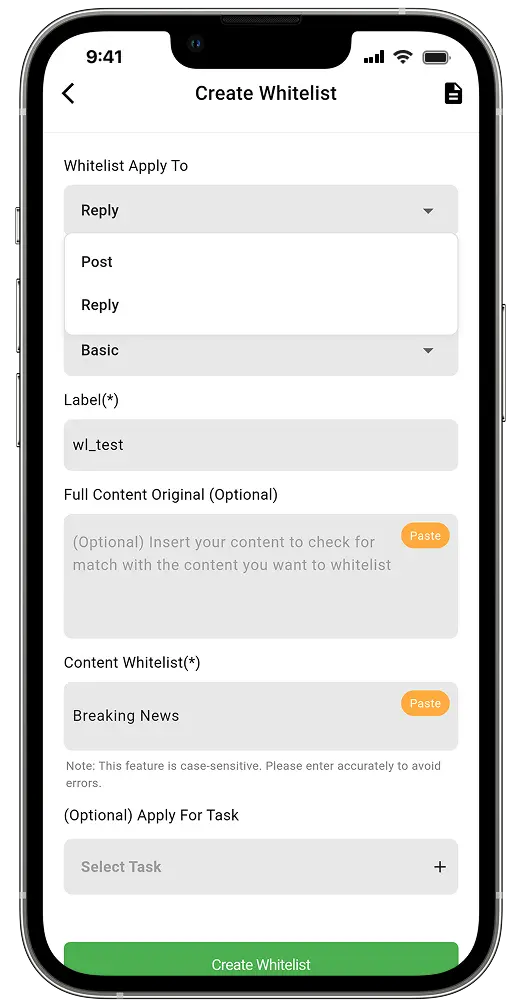
New Filtering Options:
_reply: Forwards replies only if the original post matches your filter._reply_regex: Adds pattern matching for flexible control.
Why It’s Useful:
- Ensures messages maintain context across threads.
- Skips off-topic replies or spam responses.
- Perfect for moderated groups or news commentaries.
📌 Tip: Use reply filtering to keep forwarded content coherent and clean.
👤 White List & Black List by User + Keyword Conditions Using ==AND==
Until now, filters were limited to one condition at a time. With this update, you can add logic-based control that filters by both user and keyword.
How It Works:
UserID==AND==keyword
Example Use Cases:
- Black List by User: If a message comes from Telegram user ID
1122334455and mentions“listing”, it won’t be forwarded. - Track high-priority posts from selected bots with specific terms like “alert” or “launch”.
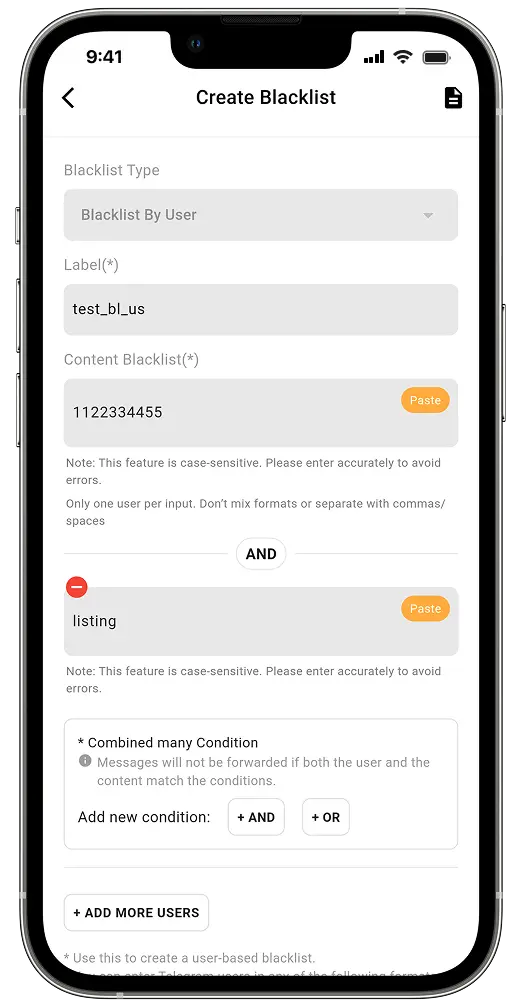
Key Benefits:
- High precision without false triggers.
- Keeps only meaningful content in your target channels.
- Eliminates the need for custom scripts.
📲 Available Across All Major Platforms
You can access version 1.0.33 wherever you manage Telegram automation:
- iOS → App Store
- Android → Google Play
- Web → web.autoforwardtelegram.com
- Telegram Bot → @Auto_Forward_Messages_Bot
Final Thoughts: Smarter Telegram Forwarding Starts Now
The What’s New Auto Forward For Telegram v1.0.33 release isn’t just about minor improvements—it brings deeper automation control, better organization, and smarter filtering to your Telegram experience.
If you’ve been managing tasks manually or juggling unstructured rules, now is the time to simplify. With folders, reply awareness, and combined filter logic, this update helps you forward only what’s useful—on your own terms.
📬 Stay Ahead of Every Update
Want to receive more expert tips, tutorials, and early access features?
Subscribe now or connect with the RedFox team directly via @redf0x1. Let your feedback shape the next version.