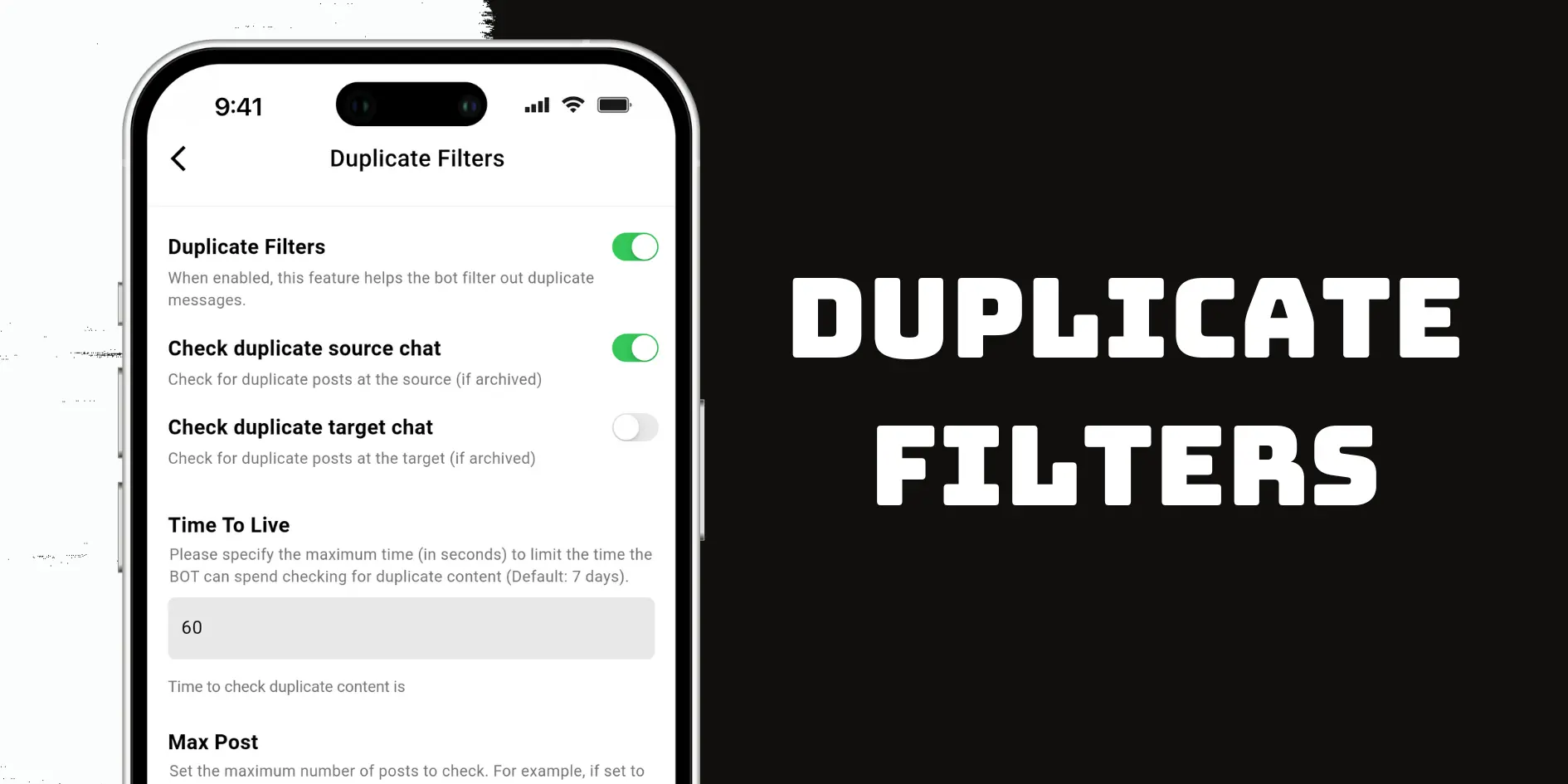
Many users feel frustrated when repeated messages clutter their Telegram channels—you’re likely one of them. Fortunately, the Duplicate Filters Auto Forward Messenger feature offers a simple yet powerful solution.
This guide shows you how to activate Duplicate Filters, adjust detection settings, and control the messages forwarded to your target chats.
🔍 Why Use Duplicate Filters Auto Forward Messenger?
By default, Auto Forward Messenger forwards every message, even duplicates. This often leads to message spam, especially in active groups. Fortunately, Duplicate Filters help you:
- Prevent repeated content from flooding your target chats
- Decide where and how the bot detects duplicates
- Enhance the overall quality of forwarded content
Additionally, enabling these filters makes your Telegram workflow more efficient.
🛠️ Step-by-Step: How to Enable Duplicate Filters Auto Forward Messenger
1. Open a Forwarding Task
First, navigate to the task you want to configure.
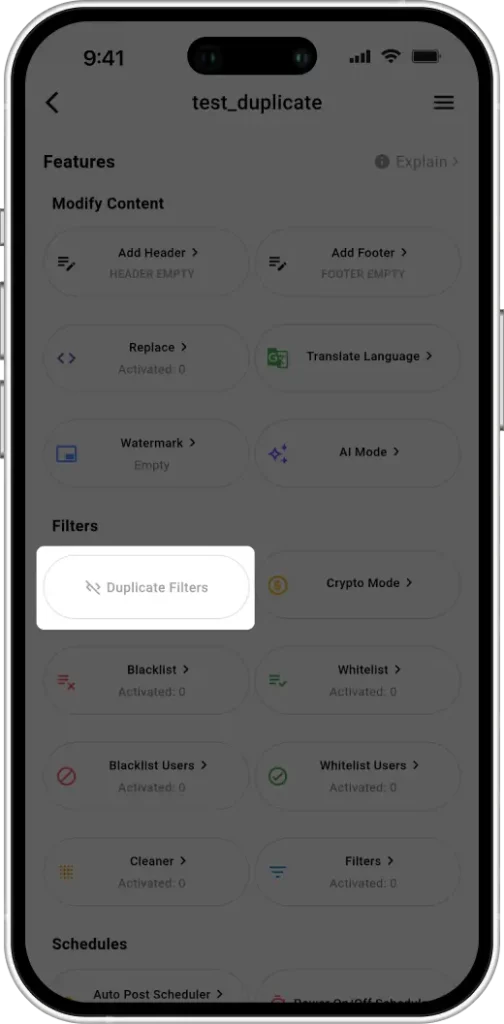
2. Locate the “Duplicate Filters” Section
Then, scroll down and tap on Duplicate Filters Auto Forward Messenger to expand the settings.
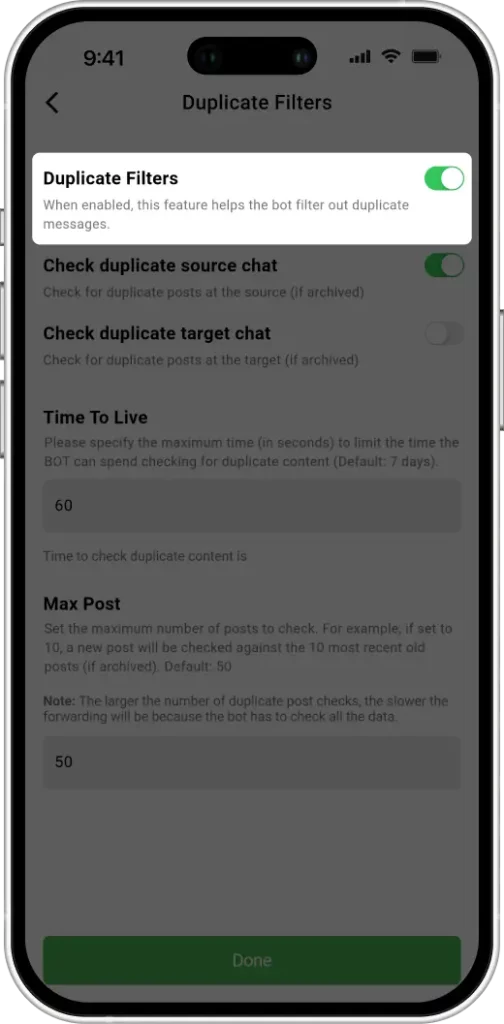
3. Enable the Filter
Next, toggle the filter switch. Once enabled, tap Done to apply your changes.
🔄 What Happens After Enabling?
Try sending two identical messages from the same source:
- Before you enable it: The bot forwards both messages to the target chat.
- After enabling it: The bot allows the initial message and filters out any duplicates that follow.
⚙️ Advanced Duplicate Filters Auto Forward Messenger Options
Auto Forward Messenger offers advanced controls beyond the basic toggle so you can fine-tune how it identifies duplicates.
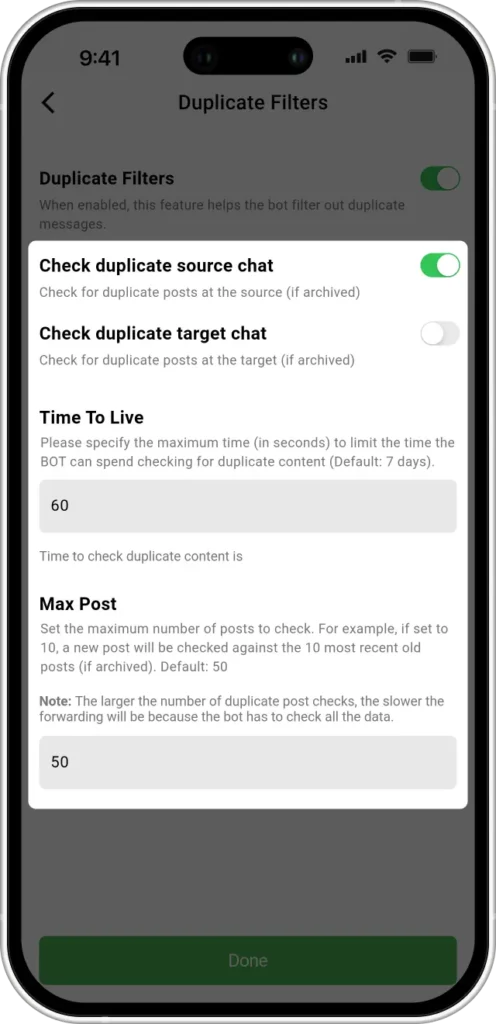
1. Check Duplicate Source Chat
Enable this option to check for repeated messages in the source chat.
- If you have multiple message sources, and for each source you want to avoid receiving duplicate information from that same source
- It’s ideal for filtering content from multiple similar channels.
2. Check Duplicate Target Chat
Enable this option to verify whether the same message already exists in the target chat.
- As with the source, the target chat must be archived for this to work.
- This avoids reposting messages multiple times to your destination channel.
💡 Tip: Enabling both source and target checks gives you maximum duplicate protection.
3. Time To Live (TTL)
This option defines how long a message remains in memory for comparison against incoming messages.
- Default value: 604800 seconds (7 days)
- After this time passes, repeated messages will no longer be recognized as duplicates.
💡 Tip: Use shorter TTL values if your content refreshes frequently.
4. Max Post
This setting limits how many recent messages will be stored and checked for duplication.
- Example: If set to 3, the system will only compare incoming messages to the last three forwarded ones.
- Any new message that matches one of those three will be filtered out.
⚠️ Please note: the higher you set the max post value, the slower the automatic message forwarding will be. We recommend keeping the default value of 50 and only adjusting it if absolutely necessary.
📘 Practical Use Case
Let’s say you configure your settings like this:
- Duplicate Filters enabled
- Source and Target Checks active
- TTL set to 60 seconds
- Max Post set to 3
Now, when someone sends the same message repeatedly:
- If it’s sent again within 60 seconds and among the last 3 messages → ❌ It gets filtered.
- If it’s sent after 60 seconds or beyond the last 3 messages → ✅ It will be forwarded.
Clearly, these rules offer flexible and precise message filtering.
✅ Best Practices for Using Duplicate Filters
- Always archive source/target chats for duplicate detection to work.
- Enable both check options for full control.
- Set TTL to match how quickly your content flows.
- Tweak Max Post to limit how far back duplicates are scanned.
✅ Conclusion
The Duplicate Filters Auto Forward Messenger feature is an essential tool for keeping your Telegram channels clean, especially when forwarding from multiple sources.
Whether you manage crypto groups, news feeds, or automated alerts, this feature ensures your audience only receives meaningful content—once.
➡️ Try Duplicate Filters today and enjoy smarter, cleaner message forwarding!